

Showing posts with label blended learning. Show all posts
Showing posts with label blended learning. Show all posts
Tuesday, February 14, 2017
Tuesday, February 7, 2017

Tuesday, November 29, 2016
Blended Learning: Zearn

Independent Digital Lesson Components
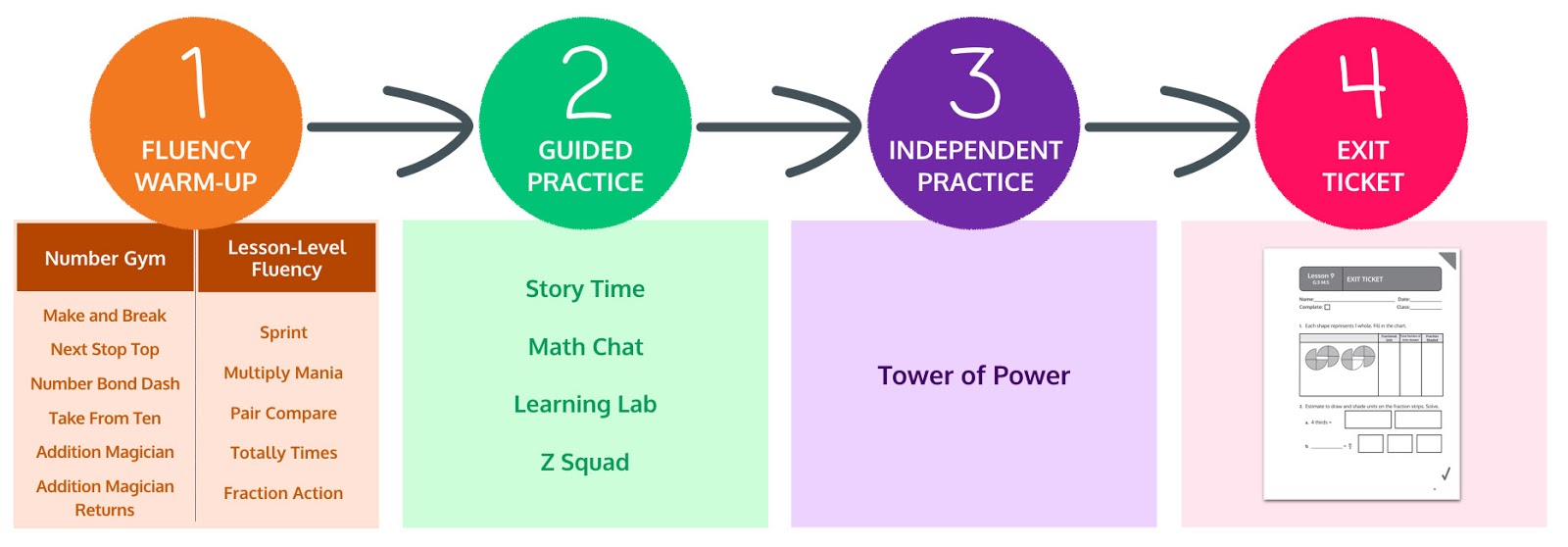
Report Overview

Zearn 3-minute demo video: https://www.zearn.org/#learn-about-zearn-math
Sample schedules for structuring a Zearn Math block: http://help.zearn.org/zearn-in-your-math-block/math-block
A “test-drive” of our digital lessons and resources available to teachers: https://www.zearn.org/curriculum/33
Check out Ms Bigelow's interactive whiteboard instruction while students also work on #Zearn! @smillerely @zearned pic.twitter.com/YfuotV0QCS— Mark Ketterhagen (@markketter) February 22, 2016
Monday, August 8, 2016
Teachers are Superheros with a Powerful Superpower
"Technology amplifies your teaching. You're the hero, you just need a superpower and that's technology. That technology is your help" - Dr. Kecia Ray
 The second day of #iDC2016 (technology conference within D.C. Public Schools) started off well with the keynote speaker Dr. Kecia Ray, with the Center for Digital Education. Dr. Ray highlighted what education should look like today. Her message indicated that there are no negatives with personalized learning and only positives. She emphasized that technology is changing the landscape of teaching.
She shared the video from Dateline NBC that highlights the changes with technology from the "olden days" to the present. Students have access to much different technologies today than were available not even that long ago.
In what ways do you feel that "technology is changing the landscape of teaching?"
Is technology a teacher's superpower?
"Tech amplifies your teaching. You're a hero, you just need a superpower & that's technology" -@keciaray #iDC2016 pic.twitter.com/xVMx2IDiOg— Cassandra Davenport (@davenportcass) August 4, 2016
Saturday, August 6, 2016
When is 1:1 appropriate?
Devices can be important for student engagement, creativity, and personalized learning. However, students need to be developmentally ready to engage with technology in a meaningful and productive way. With many districts looking to adopt a 1-to-1 device model as resources are reallotted, at what grade do you think this program should be introduced?
Please share any additional thoughts on 1:1 or grade level introduction in the comment section below. I would love to hear any and all explanations.
Please share any additional thoughts on 1:1 or grade level introduction in the comment section below. I would love to hear any and all explanations.
Starting at what grade is 1-to-1 devices important and appropriate?
 0%
0%Wednesday, August 3, 2016
D.C. Public Schools Deputy Chief talks Blended Learning
Two weeks ago, Justin Bruno, with the Michigan Virtual Learning Research Institute (MVLRI) spent some time interviewing David Rose who is the Deputy Chief of Educational Technology and Library Programs with DCPS to speak about the district's work with blending learning in their schools. Be sure to check out more interviews by MVLRI with other national leaders at their Virtual Viewpoints Podcast.
Learn more about the districts work with blended learning in the guest blog post by John Rice, Director of Secondary Educational Technology :
Read about one program's (ST Math) success in the district at:
Learn more about the districts work with blended learning in the guest blog post by John Rice, Director of Secondary Educational Technology :
Read about one program's (ST Math) success in the district at:
Sunday, July 31, 2016
DC Tech Talk

You are encouraged to tweet about today's event using the hashtags #frontrowed & #DCtechtalk
*SMART Lesson Activity for Random Number drawing
*SMART Lesson Activity for Random Number drawing

 Front Row - Join the demo class to play as a student.
Username: Smarty Pants Code: daven3
Username (Spanish): Stu Dent Code: daven3- New updates! - Gameboard background, word study, improved teacher dashboard, fact practice reports, ELA Benchmarks
- Detailed practice reports - individual practice reports
- Printables - Individualized practice problems for each standard!
Brand new to Front Row? Let's start by setting up your account
Monday, October 19, 2015
Digital Learning Stations - Blended Learning Programs
Part 2 of 6
myOn Reader is an on-line digital library from Capstone books. Our students have access to over 1700 books online anytime, anywhere! These books are in full color and the students may choose to have them read to them or read them alone. These books come in Spanish and English. Think of utilizing this resource as a center, home connection or whole class read alouds.
All teachers and students have access to this resource with individual accounts linked to the classroom teacher. Please check out the myOn folder for more info on how to login and get started with your students. (This info lives in the Drive > Whole School > Technology).
Quick Start Tips:
Go to www.myon.com
Language Arts
myOn Reader is an on-line digital library from Capstone books. Our students have access to over 1700 books online anytime, anywhere! These books are in full color and the students may choose to have them read to them or read them alone. These books come in Spanish and English. Think of utilizing this resource as a center, home connection or whole class read alouds.
All teachers and students have access to this resource with individual accounts linked to the classroom teacher. Please check out the myOn folder for more info on how to login and get started with your students. (This info lives in the Drive > Whole School > Technology).
Quick Start Tips:
Go to www.myon.com
Student login info:
(just like ST Math & iReady, yay!)
Teacher login info:
Username = Student ID #
Username = first name.last name
Imagine Learning

- While we only have 35 individual student licenses...you can utilize all the resources/lessons
- Use Internet Explorer: Website: 10.169.15.82 (only works at school)
- Login: username: teacher password: __________________
Math
Student login info:
(just like ST Math & iReady, yay!)
|
Teacher login info:
|
Username = Student ID #
Password = 6 digit birthdate
|
Username = first name.last name
Password =
|
Imagine Learning

- While we only have 35 individual student licenses...you can utilize all the resources/lessons
- Use Internet Explorer: Website: 10.169.15.82 (only works at school)
- Login: username: teacher password: __________________

Math
ST Math
- Change student groups, change curriculum order to meet your class scope & sequence
- Assign homework where appropriate

- Think about running Classroom Connections for centers or whole group - you can run any lesson you want from Test Drive!
iReady

Go Math
- Progress Monitoring
- Enable Instruction

Go Math
- Thank you Ms. Moessner! (hint, hint)
- Resources

Wednesday, October 8, 2014
Imagine Learning - Resources for all Teachers

Imagine Learning can be a great resource for any teacher. All of the 5,000+ lessons are accessible to any teacher with an account, if the school has licenses for students. I have already created accounts for the kindergarten teachers, please let me know if you would also like to utilize this tool with your students.

You can use the Imagine Learning lessons whole class or with a small group. Using it with the Smartboard would help to increase student engagement.
Note: Unfortunately, you can only use the Imagine Learning website while in-network
Imagine Learning Website: 10.169.15.82
Check out the video below to see how to access the resources and printable guides.
Subscribe to:
Posts (Atom)